Pastel LED Strip H1
Product Information
Basic Information
| Parameter | Description |
|---|---|
| Name | Pastel LED Strip H1 |
| Product Type | Lighting |
| Model Number | DCLBDD01LM |
| SKU Code | AL262CNW01 |
| SPU Code | AL262 |
| Barcode | 6978350353685 |
| Product ID | A02098 |
Product Highlights
Key Features
- Full Gamut Tinted Color Technology: Based on new-generation multi-channel mixing solution, equipped with customized tinted LEDs and mixing algorithm, achieves 1800K-12000K ultra-wide color temperature coverage and full gamut tinted ambient lighting, with color performance infinitely close to natural light color variations.
- 16-bit High-Precision Dimming: 65,536-level grayscale (16-bit) fine dimming with silky smooth color transitions, flicker-free for eye protection.
- Ultra-High Color Rendering Index: Adopts Ra97 high CRI light source with color reproduction close to natural light, achieving both high-quality base lighting and ambient lighting.
- High-Density LED Arrangement: 192 LEDs/meter high-density LED arrangement, uniform light output without dark zones, luminous flux up to 1100 lm/meter (4000K).
- Flexible Cutting and Installation: Minimum cutting length 62.5mm, 10-meter roll can be cut as needed, 3M adhesive/mounting clips/aluminum profile multiple installation methods, flexibly adapting to various spaces.
- AI Scene Generation: Used with Aqara Pastel Light Strip Controller H1, supports AI scene generation capability, one-click generation of sunrise, blue sky, aurora, holiday, and other lighting scenes with differentiated advantages.
- Aqara Whole-Home Ecosystem: Deeply integrated with Aqara smart ecosystem. Based on Studio platform, supports sound-light linkage, automation scenarios, and multi-device linkage with door locks/curtains/sensors to build complete smart home experience.
Product Specifications
Basic Specifications
| Parameter | Description |
|---|---|
| Product Dimensions | 10000 x 10 x 1.2mm (10m/roll) |
| Rated Power | 100W/roll (10W/m) |
| Input Voltage | DC 24V |
| Mounting Method | 3M adhesive paste / Mounting clips / Aluminum profile fixation |
| Execution Standard | GB/T 24819-2023 |
| Operating Temperature | -20℃ ~ 40℃ |
| Operating Humidity | 5% ~ 85% |
| Supporting Equipment | Aqara Pastel Light Strip Controller H1 + DC24V power supply |
Light Source Specifications
| Parameter | Description |
|---|---|
| LED Quantity | 192 LEDs/m |
| LED Strip Width | 10mm |
| Color Temperature Range | 1800K-12000K, tinted color |
| Color Rendering Index | Ra97 |
| Luminous Flux | 830 lm/m (2700K) / 1100 lm/m (4000K) |
| Minimum Cutting Length | 62.5mm |
| Dimming Grayscale Level | 65,536 levels (16bit, with controller) |
Main Materials
Flexible Printed Circuit (FPC) substrate, 2835 dual-tinted LEDs, 3M adhesive
Product Appearance
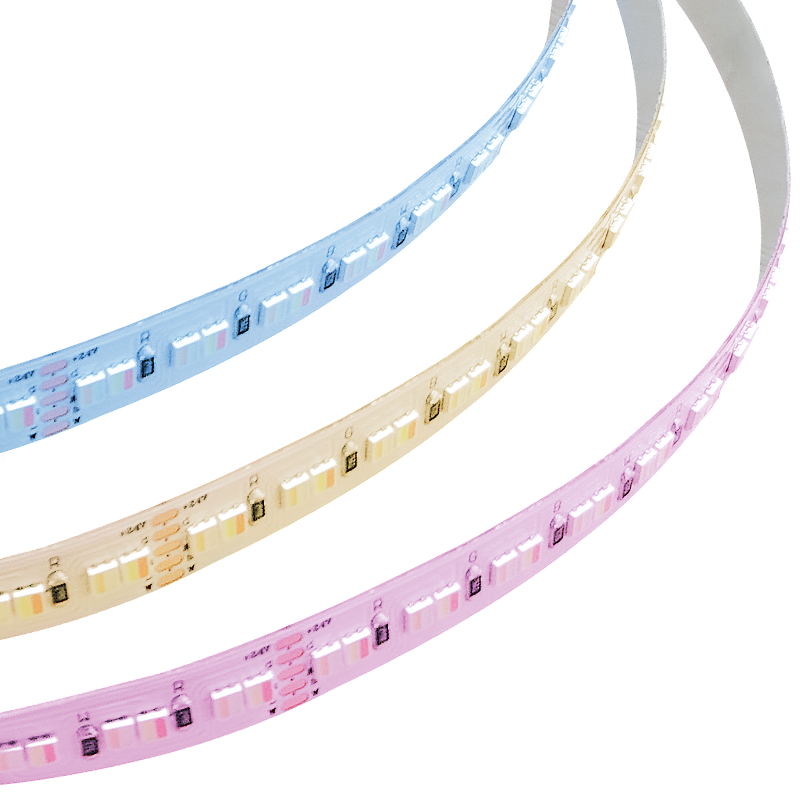
Appearance Description
10mm wide quad-color bare board LED strip, 10 meters per roll. Board surface features high-density arrangement of 2835 dual-tinted LEDs (192 LEDs/meter), four-color (RGBW) independent channel mixing, back side comes with 3M adhesive for easy paste installation, surface marked with cutting indicator lines (every 62.5mm), flexible cutting available.
Product Overview
Aqara Pastel LED Strip H1 is a quad-color (RGBW) LED strip adopting 2835 dual-tinted LEDs. Suitable for cabinet lighting, ceiling coves, feature walls, bedside ambiance, stair lighting, decorative lighting and other home and commercial lighting scenarios.
- This device requires use with Aqara gateway and Aqara Pastel Light Strip Controller H1 for full functionality support. Certain specific features are only supported within the Aqara ecosystem.
Installation Guide
Installation Conditions Confirmation
| Parameter | Description |
|---|---|
| Installation Tools | 3M adhesive (included), mounting clips, aluminum profiles, insulating tape, isopropyl alcohol (for cleaning) |
| Installation Environment | This product is indoor-specific LED strip for common environments; following environmental conditions must not be used:
|
| Supporting Equipment | Aqara Pastel Light Strip Controller H1, DC24V driver power supply (output power >= connected LED strip power) |
| Power Requirement | DC 24V |
Installation Precautions
LED Strip Wiring
- Please confirm power is turned off before installation to avoid electrical accidents; perform wiring and installation operations in powered-off state;
- Input voltage must not exceed: 24V (+/-10%).
- Separate routing of lighting circuits and other power circuits (such as air conditioning or high-power motor equipment).
LED Strip Installation
-
Light source of this product should be replaced by manufacturer or its service agent or personnel with similar qualifications;
-
This product only supports use with specified controller; usage method: LED Strip + Aqara Pastel Light Strip Controller H1 + DC24V power supply;
-
Before maintaining or installing LED strip, confirm power has been disconnected, confirm wiring is correct before turning on power. (Risk of electric shock)
-
Under no circumstances should LED strip be covered by thermal insulation pads or similar materials; ensure at least 100mm space around product.
-
During operation and after shutdown, LED strip is in high-temperature state; do not touch LED strip. (Risk of burns)
-
Please do not disassemble or arbitrarily cut LED strip. (Risk of electric shock, fire, falling, malfunction)
-
Please do not operate installation with wet hands. (Risk of electric shock)
-
This LED strip power cord is Z-type connection; if flexible cord is damaged, this LED strip shall be scrapped.
-
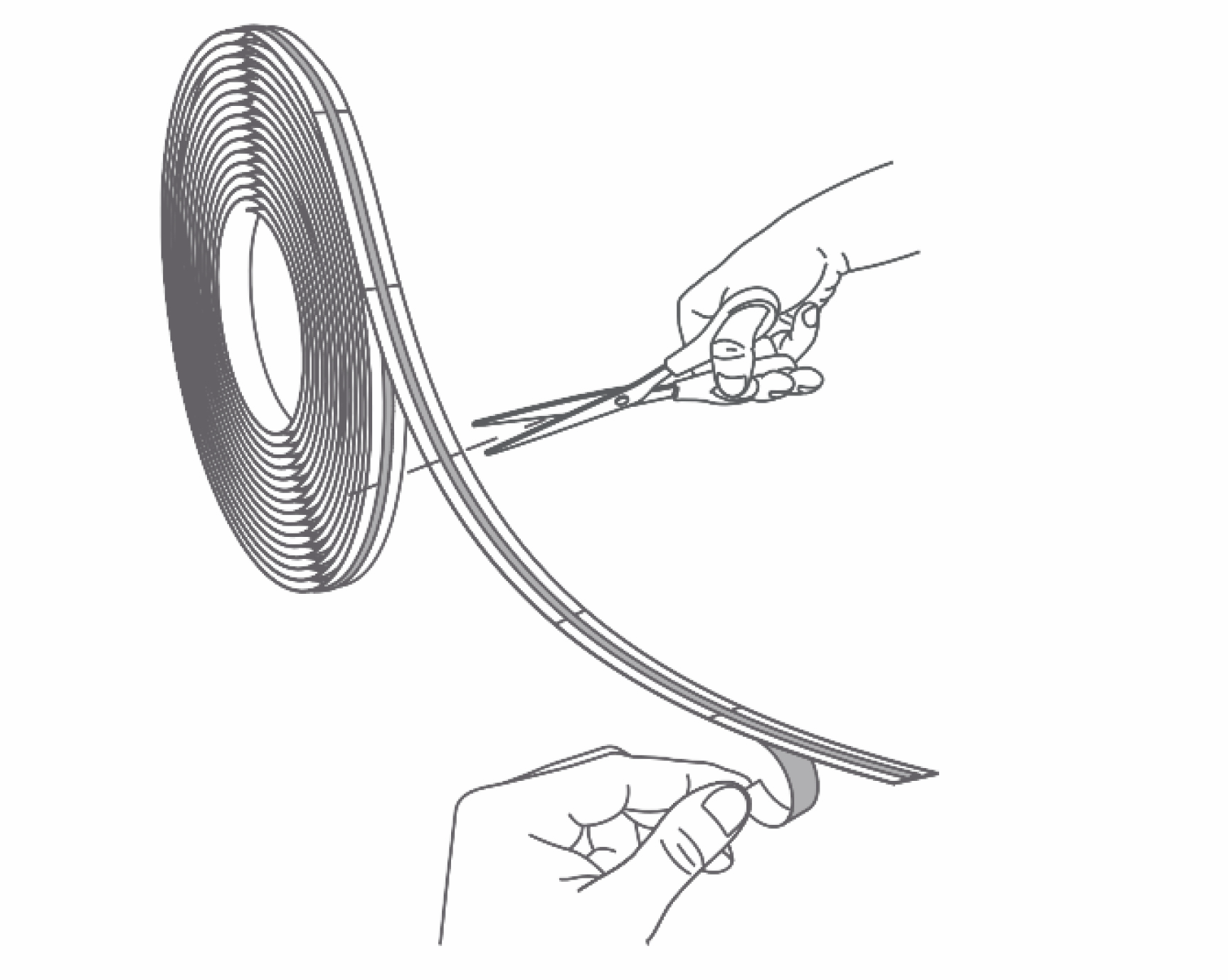
Cutting LED strip must be done at cutting mark positions on strip; minimum cutting length is 62.5mm;
-
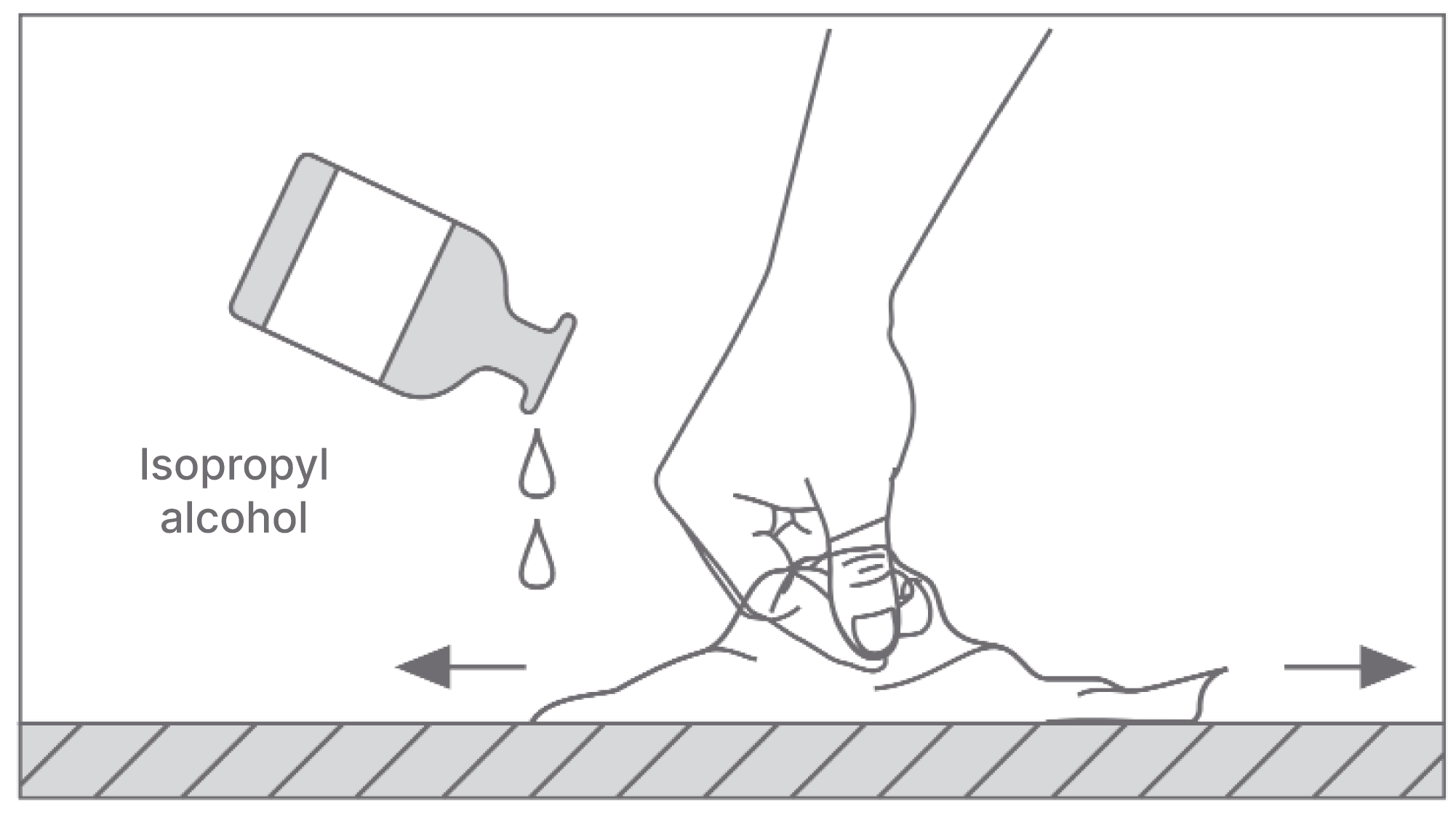
When using 3M adhesive on back of LED strip for fixing, clean mounting surface to ensure it is dry, clean, and flat (isopropyl alcohol can be used if necessary); after pasting, fully press LED strip to ensure firm adhesion with mounting surface;
-
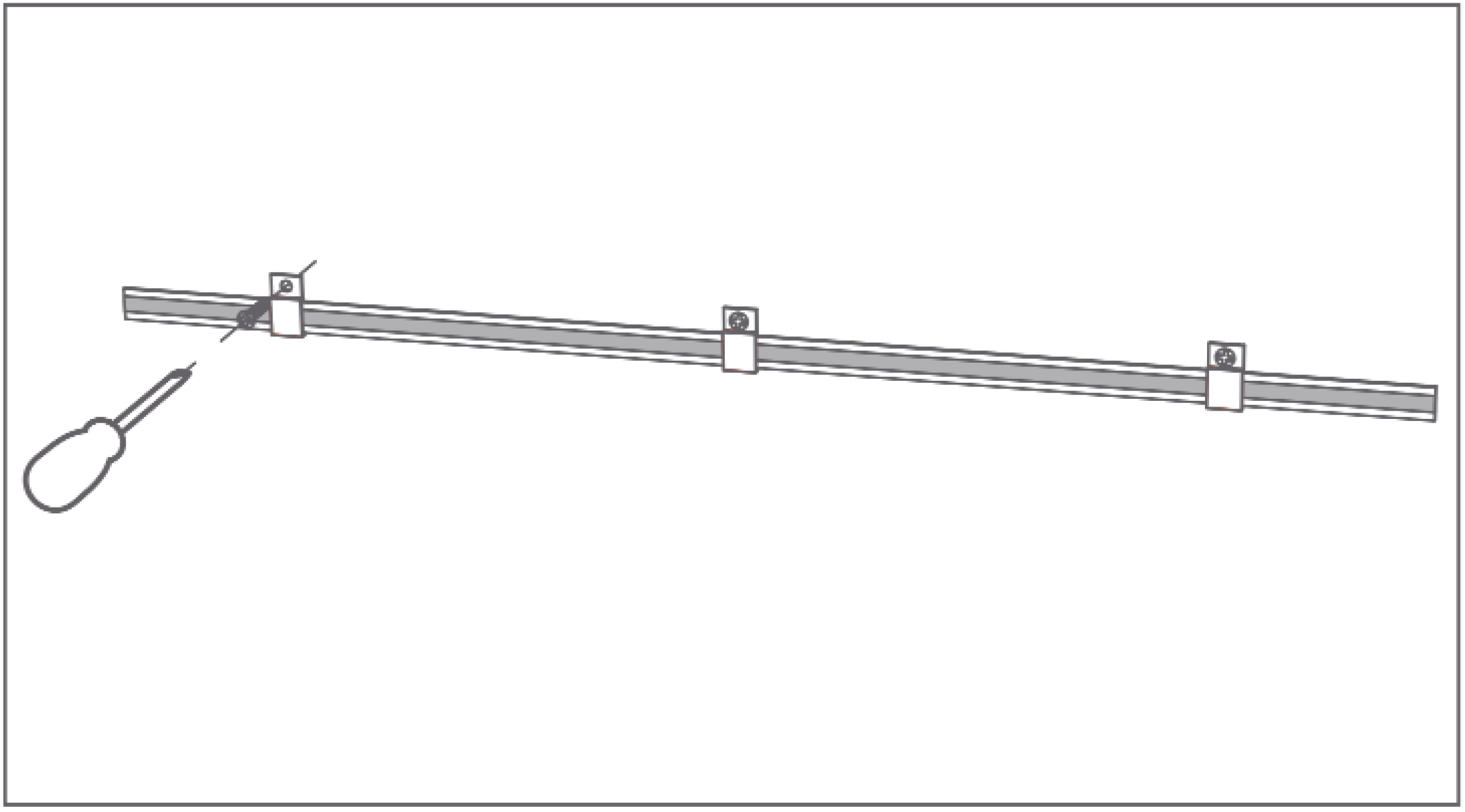
When necessary, coordinate with mounting clips, aluminum profiles and other accessories for auxiliary fixing to prevent LED strip from falling off;
-
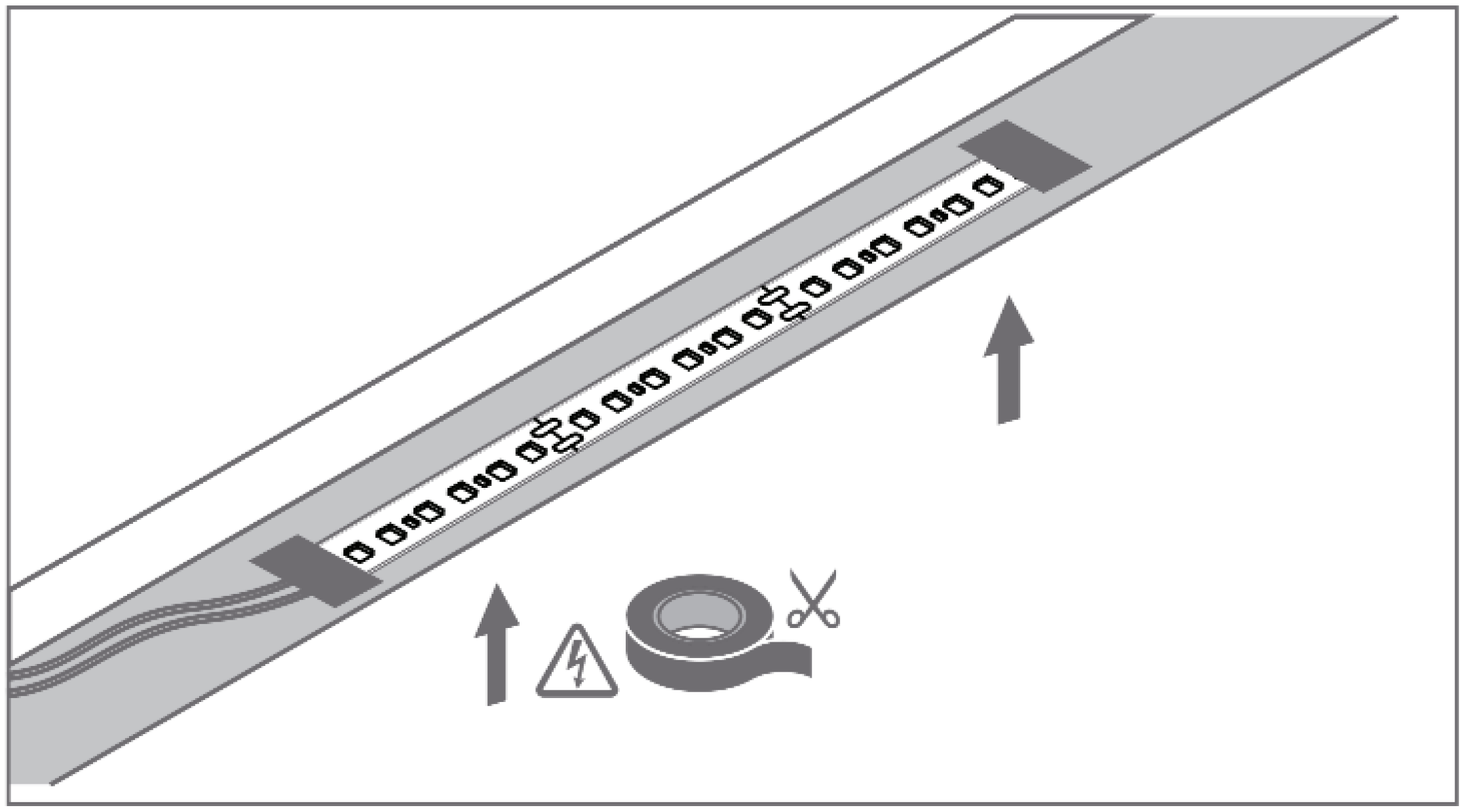
Add insulating tape at end of LED strip to isolate conductive contact, avoid positive/negative short circuit, burning, tripping;
-
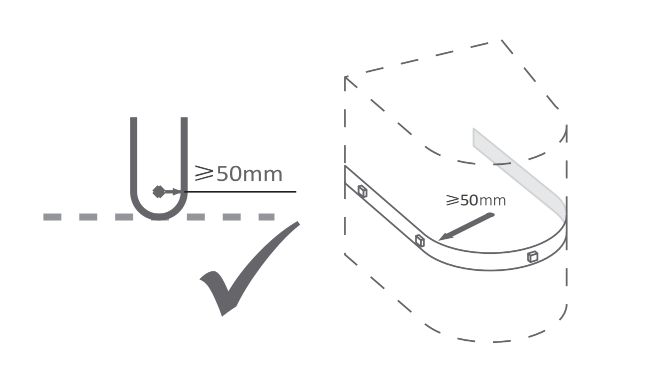
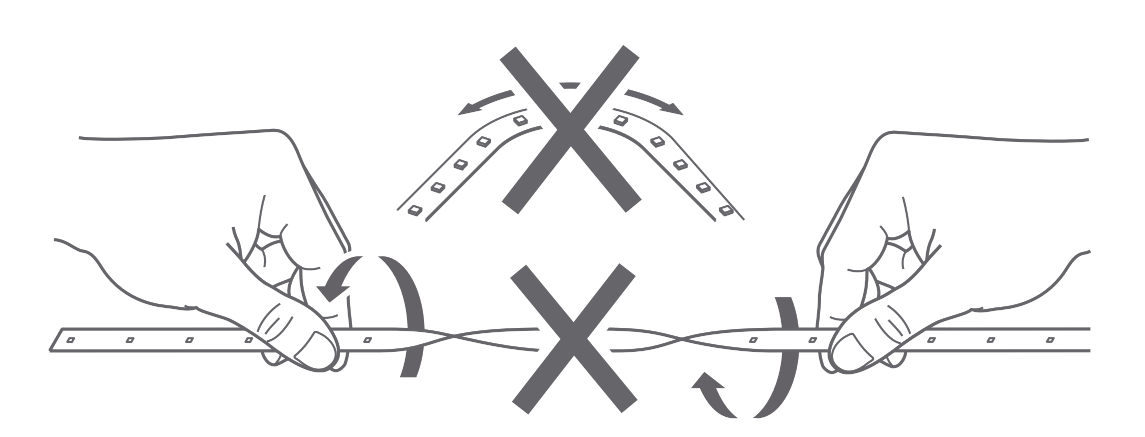
Follow standard operating procedures for bending operations; minimum bending radius 50mm, do not twist LED strip; excessive bending angle or non-standard operation will adversely affect product internal structure;
-
Do not bend or excessively pull LED strip connection cables.
Maintenance
- Regularly wipe LED strip surface with dry soft cloth to avoid dust accumulation affecting light output;
- Do not use chemical solvents to clean LED strip;
- When not in use for extended periods, store in dry environment after disconnecting power.
Troubleshooting Guide
Issue 1: LED Strip Not Lighting
| Possible Cause | Solution |
|---|---|
|
|
Issue 2: LED Strip Partially Not Lighting / Local Dark Areas
| Possible Cause | Solution |
|---|---|
|
|
Issue 3: Abnormal Dimming / Flickering
| Possible Cause | Solution |
|---|---|
|
|
Special Notes
Coordinated Usage Instructions
- Aqara Pastel Light Strip Controller H1 and Aqara Pastel LED Strip H1 are sold and used as coordinated set; controller is platform solution;
- Controller input voltage is DC 24V, cannot be directly connected to mains, must be used with power supply outputting DC 24V; driver power supply output power must be greater than or equal to connected LED strip power;
- Controller has only one output, does not support splitting into multiple channels for independent control (different from dual color temperature LED strip module's two-channel independent control).
FAQ
How to cut LED strip? What is the maximum length that can be connected?
Cutting LED strip must be done at cutting mark positions on strip; minimum cutting length is 62.5mm. LED strip is 10 meters per roll, 10W/meter; actual connectable length depends on controller output power (480W Max) and power supply power; driver power supply output power must be greater than or equal to total power of connected LED strip.
What precautions should be taken during LED strip installation?
Cut off power before installation; clean mounting surface and fully press when using 3M adhesive for fixing; coordinate with mounting clips, aluminum profiles for auxiliary fixing when necessary; add insulating tape at LED strip end to avoid short circuit; minimum radius 50mm for bending operation, do not twist LED strip.