Pastel Light Strip Controller H1
Product Information
Basic Information
| Parameter | Description |
|---|---|
| Product Name | Pastel Light Strip Controller H1 |
| Model Number | ZNDDMK12LM |
| Product Type | Lighting |
| Barcode | 6978350352824 |
| SKU Code | AL255CNW01 |
| Product ID | A01902 |
Product Highlights
Key Features
- Part of Aqara Pastel series, featuring new-generation quad-color mixing technology, designed for use with matching Aqara Pastel LED strips.
- Supports wider color temperature range and rich tinted color light expression, meeting lighting needs for different scenarios.
- Compared to traditional dual color temperature solutions, provides more delicate light color changes, with light environment closer to natural light variation patterns.
- Supports Zigbee and Thread dual protocol connection, can access Aqara or Matter-compatible third-party ecosystems.
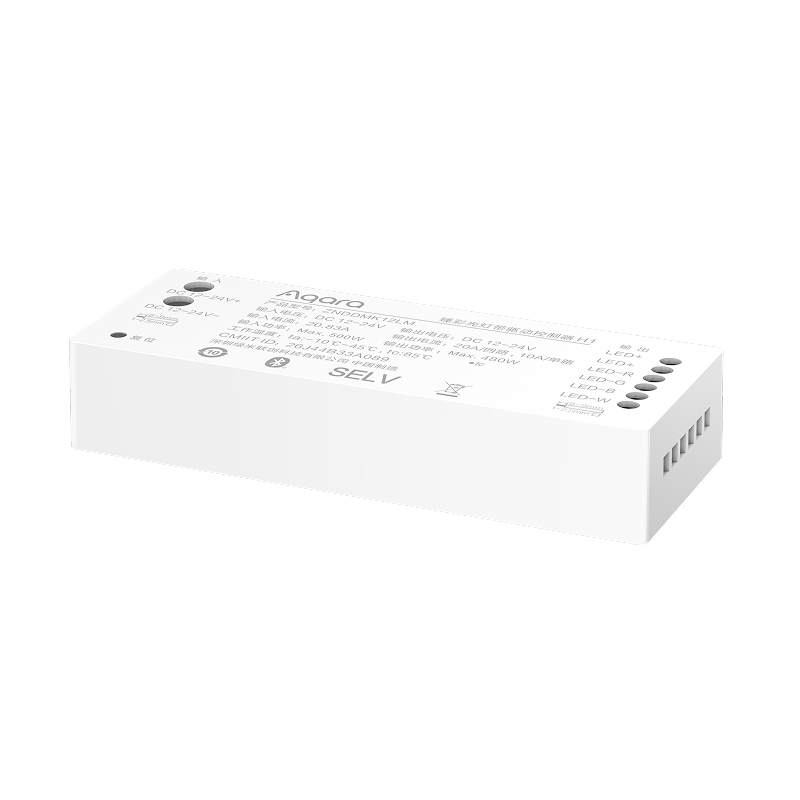
Product Image
Product Specifications
Basic Specifications
| Parameter | Description |
|---|---|
| Product Dimensions | L125.5 x W48.5 x H23.5 mm |
| Net Weight | 149g |
| Operating Temperature | -10 ~ 45C |
| Operating Humidity | 0-85%, non-condensing |
| Input Voltage | DC 12-24V |
| Input Current | 20.83A |
| Input Power | max. 500W |
| Output Power | max. 480W |
| Output Current | 20A Max, 10A/channel |
| Output Ports | LED+ x2, R, G, B, W (single output only, does not support multi-channel independent control) |
| Communication Protocol | Zigbee, Thread, Bluetooth Low Energy |
| Protection Rating | IP20 |
| Mounting Method | M3 x 8mm self-tapping screw fixation |
| Package Dimensions | L129 x W52 x H28 mm |
| Outer Carton Dimensions | L305 x W275 x H180 mm |
| Package Contents | Pastel Light Strip Controller H1 x1, User Manual x1, M3 x 8mm self-tapping screws x3 |
Only supports use with Pastel LED Strip H1 (DCLBDD01LM), does not support other single color temperature, dual color temperature, or RGB LED strips.
Main Material
PC
Product Appearance
Wiring Diagram
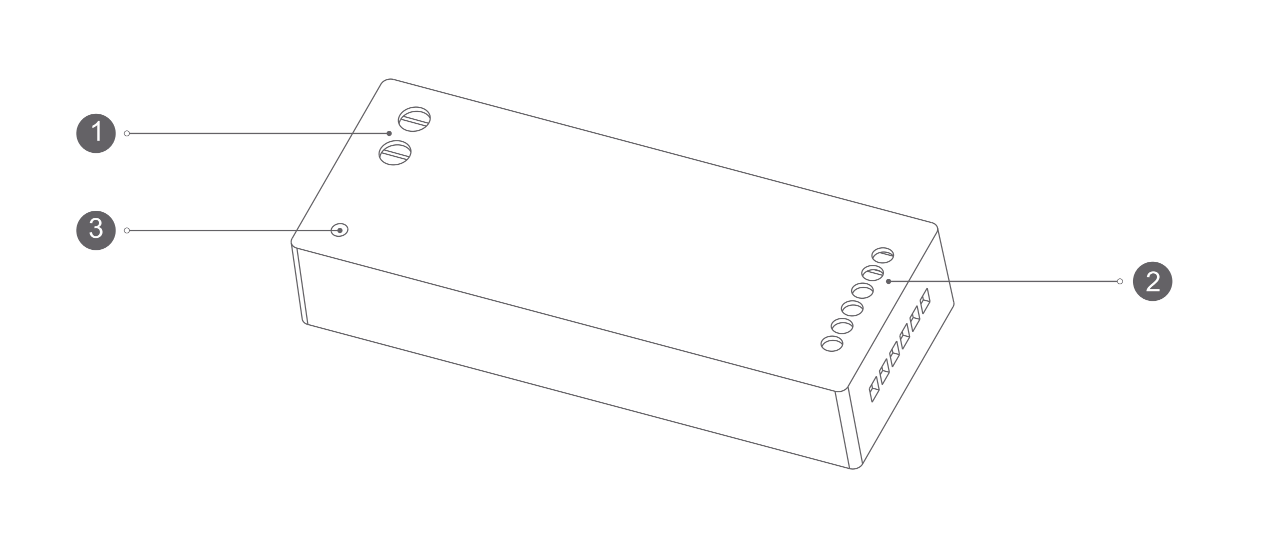
| No. | Port Name | Function Description |
|---|---|---|
| 1 | Input Terminal | Connect to DC 24V power supply (do not connect directly to mains) |
| 2 | Output Terminal | Controls LED strip positive and R, G, B, W LED outputs |
| 3 | Reset Button | Used for device reset and factory restore |
Product Overview
The Pastel Light Strip Controller H1 adopting new-generation quad-color mixing technology. It supports wider color temperature range (1800K-12000K) and rich tinted color light expression, meeting lighting needs for different scenarios.
Compared to traditional dual color temperature solutions, this technology provides more delicate light color changes, making the light environment closer to natural light variation patterns, thereby enhancing comfort and layering of space illumination. The controller adopts DC 12-24V input with output power up to 480W Max, capable of driving longer LED strips. Output ports include LED+ x2, R, G, B, W totaling 5 channels, supporting only single output, not multi-channel independent control.
The device supports Zigbee and Thread dual protocol connection (factory default is Zigbee), and can access Aqara Studio or Matter-compatible third-party ecosystems according to usage environment. It supports static and dynamic scene customization, 0~10s gradient transition, custom lighting transition curves and other advanced configurations. Combined with other Aqara smart devices, rich automation functions can be achieved.
- This device requires use with Aqara gateway for full functionality support. Certain specific features are only supported within the Aqara ecosystem.
Installation Guide
Installation Conditions Confirmation
| Parameter | Description |
|---|---|
| Installation Tools | Screwdriver |
| Installation Environment | Indoor use |
| Supporting Equipment | DC 24V power supply, Pastel LED Strip H1, Aqara gateway |
| Power Requirement | DC 12-24V (Do not connect directly to mains, must use with power supply outputting DC 24V) |
| Mounting Method | M3 x 8mm self-tapping screw fixation |
Installation Precautions
Please confirm main power switch is closed before installation! High-voltage wiring must be performed by professional electrician in accordance with electrical codes and product manual to avoid electrical accidents.
- This product is not a toy; keep away from children;
- This product is for indoor use only; do not use in humid environments or outdoors;
- Control device relies on luminaire housing to prevent accidental contact with live parts;
- Pay attention to moisture protection; do not splash water or other liquids onto product;
- Do not install this product near heat sources;
- This product cannot be directly connected to mains; please use appropriate control device (control device should be SELV);
- Controller has only one output; cannot split into multiple channels for independent control;
- Do not attempt to repair this product yourself; if there are quality issues, please contact official after-sales personnel.
User Guide
Quick Setup
Device Installation
Installation involves high voltage; please ensure main power switch is closed and operation performed by professional electrician.
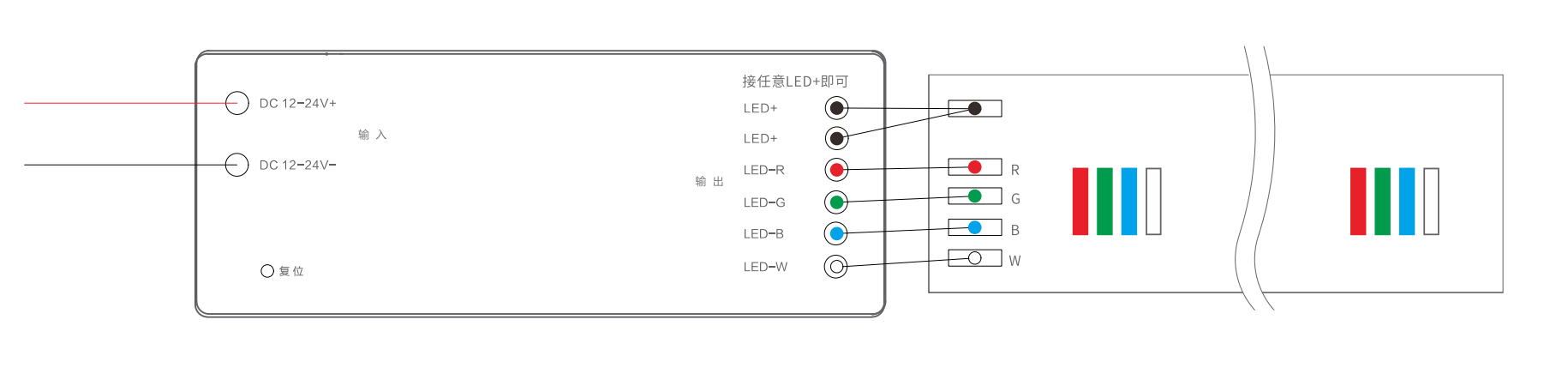
- Fix Controller: Use M3 x 8mm self-tapping screws to fix controller in suitable position.
- Connect LED Strip: Connect LED strip's LED+, R, G, B, W wires to corresponding output ports on controller.
- Connect Power: Connect DC 24V power supply output to controller's power input terminal (observe polarity).
Power On Device
Turn on power and confirm device is powered normally (when factory-default not-joined state, light breathes twice).
Device Pairing
Device defaults to Zigbee protocol for network joining. After device enters pairing mode, it can be added to Aqara Studio or Aqara Life App for use.
When device is not joined to network, upon powering on, light breathes twice and automatically enters pairing mode. Pairing time is 60s. If pairing time is exceeded, device can be power-cycled to re-enter pairing mode.
Add to Aqara Studio
According to current protocol used by device, please refer to following documents to complete addition:
| Protocol | Document |
|---|---|
| Zigbee | Zigbee Device Integration Guide |
| Matter | Matter Device Integration Guide |
Add to Aqara Life App
- Download Aqara Life App (scan QR code on manual, or search and download from Apple App Store / Google Play).
- Open App, enter "Home" page then click "+" in upper right corner to enter "Add Device" page, follow App prompts to complete addition.
Firmware Update
You can update device firmware to latest version in Aqara Studio or Aqara Life App before starting use.
| Platform | Operation |
|---|---|
| Aqara Studio | Read Firmware Update document, follow prompts to complete update. |
| Aqara Life App | Update device firmware to latest version in App settings page, follow prompts to complete update. |
If you integrate device to third-party ecosystem (such as Apple, Google or Amazon, etc.) and cannot get latest firmware, you can pull latest cloud firmware for upgrade by adding device in Aqara Life App and performing two "protocol switch" operations (such as switching Thread to Zigbee, then switching back to Thread).
Device Reset / Factory Restore
| Operation | Operation Method | Description |
|---|---|---|
| Device Reset | Long press reset button for 5s or more OR cycle power 5 times (keep powered on last time) | Light breathes twice, reset successful. Device only clears network pairing and re-enters pairing state. |
| Factory Restore | Press reset button 10 times OR cycle power 10 times (keep powered on last time) | Light breathes twice, factory restore successful. Device clears all configuration information and re-enters pairing state. |
| Switch Protocol | First remove device in Aqara Life App, then long press reset button for 5s to reset, enter pairing process, click "Switch Protocol" on device pairing screen | Note: Switching protocol is equivalent to factory restore, will clear all device settings and data. |
Product Functions
Basic Dimming
| Function | Description |
|---|---|
| On/Off | Supports basic on/off function |
| Brightness | Supports 1% - 100% brightness adjustment |
| Color Temperature | Supports 1800K - 12000K wide-range color temperature adjustment (default color temperature after device joining is 4000K natural white) |
| Color Adjustment | Supports tinted RGB color custom adjustment to meet different ambient color needs |
Scene Functions
| Function | Description |
|---|---|
| Static Scene | Can solidify and store specific combinations of white light color temperature, RGB colored light, and brightness values as dedicated scenes for one-click recall. Supports copy, edit, delete. Custom scene upper limit: matter - 30, zigbee - 26 |
| Dynamic Sequence | Supports multi-keyframe setting. Can customize keyframes with:
|
| Colored Light Dynamic Scene | Supports selecting colors through color card/palette to generate specific effects. Can customize:
|
Configuration Options
| Configuration Item | Description |
|---|---|
| Communication Protocol | Zigbee (factory default) / Thread |
| Power-On State | Four modes available:
|
| On/Off Transition Time | Default value: 1500ms, maximum range 0-10s. |
| Transition Curve Configuration | Light transitions to target state with set curve effect Adjustment method:
|
| Initial Brightness Configuration | Supports 1-50% range adjustment, default 1%, step 1%. After configuring initial brightness for power-on, light will execute transition effect from configured value as initial brightness to final state when turning on (when last power-off brightness is lower than configured initial brightness, light turns on directly at last power-off brightness without transition time) |
| Dimming Range Configuration | Click to enter to set maximum and minimum brightness of light. After setting, brightness range 1-100% on device homepage and automation components respectively correspond to maximum and minimum illuminance range settings |
| Find Device | Upon clicking, device flashes or beeps |
| LED Strip Model | Must select light source model before use, default output parameter definition, skip directly only when default value. Model list: |
Button Instructions
| Operation Method | Function Description |
|---|---|
| Single Click Reset Button | On/Off light |
| Long Press Reset Button 5s | Reset device network, clear network pairing, re-enter pairing state |
| Press Reset Button 10 Times | Factory restore, clear all configuration information, re-enter pairing state |
Indicator Light Instructions
| Indicator Status | Function Description |
|---|---|
| Light Breathes Twice | Device entered pairing mode / Reset successful / Factory restore successful |
Maintenance
- Regularly wipe product surface with dry soft cloth to avoid dust accumulation affecting usage;
- Do not use chemical solvents to clean product;
- When not in use for extended periods, store in dry environment after disconnecting power.
Supported Gateway Information
This product requires use with Aqara gateway for full functionality support. Certain specific features are only supported within the Aqara ecosystem.
| Parameter | Description |
|---|---|
| Aqara Gateway Support |
|
Automation Information
Supported Automation Triggers
| Condition Type | Supported Automation Conditions |
|---|---|
| Automation Condition | On |
| Off | |
| Is On | |
| Is Off | |
| Automation Result | On |
| Off | |
| On/Off | |
| Set Brightness | |
| Set Brightness (without switching) | |
| Set Color Temperature | |
| Set Color | |
| Set Color Temperature and Brightness | |
| Set Color and Brightness | |
| Brightness+ | |
| Brightness- | |
| Color Temperature+ | |
| Color Temperature- | |
| Adjust Color Temperature (only supports knob adjustment or cube flat flip) | |
| Adjust Brightness (only supports knob adjustment or cube flat flip) | |
| Set to Specified Scene |
Product Certification
SRRC, CCC
Troubleshooting Guide
Issue 1: Device Cannot Join Network
| Possible Cause | Solution |
|---|---|
|
|
Issue 2: Device Cannot Pair / Connect
| Possible Cause | Solution |
|---|---|
|
|
Issue 3: LED Strip Not Lighting / Abnormal Color
| Possible Cause | Solution |
|---|---|
|
|
FAQ
Can Pastel Light Strip Controller H1 only be used with Pastel LED Strip H1?
Yes. controller is specifically designed for use with Pastel LED Strip H1 does not support single color temperature, dual color temperature, or RGB LED strips. Different specifications of quad-color tinted LED strips may be launched in future based on actual production needs.
Can Pastel Light Strip Controller H1 control multiple channels independently? For example, can dual color temperature LED strip modules control two channels independently?
No, only single channel.
Can Pastel Light Strip Controller H1 be connected directly to mains?
No, controller input voltage is DC 12-24V, needs to be used with power supply outputting DC 24V.
How to enter pairing mode?
When device is not joined to network, upon powering on, light breathes twice and automatically enters pairing mode. Pairing time is 60s. If pairing time is exceeded, device can be power-cycled to re-enter pairing mode.
How to reset device?
Long press reset button on controller for 5s or more, or cycle power 5 times (keep device powered on last time). If light breathes twice, reset is successful. After device reset, device only clears network pairing and re-enters pairing state.
How to factory restore?
Press reset button on driver 10 times or cycle power 10 times (keep device powered on last time). If light breathes twice, factory restore is successful. After factory restore, device clears all configuration information and re-enters pairing state.
How to switch protocol?
If need to switch protocol during device usage, first remove device in Aqara Life App, then long press device reset button for 5 seconds to reset device, enter pairing process, click "Switch Protocol" on device pairing screen and select required protocol, complete setup according to application instructions. Note: Switching protocol is equivalent to factory restore, will clear all device settings and data.
Does device support power-off memory function?
Yes, device factory default is "Restore state at power-off". User can change post-power-on state according to own needs in post-power-on state settings, can also set to lights on after power-on, lights off after power-on, and reverse (opposite to state before power-off).
What other features does device have?
Pastel Light Strip Controller H1 series supports static and dynamic scene customization; also has on/off transition time setting function, supports 0~10s gradient duration range selection; supports custom lighting transition curves and other advanced configurations; additionally, combined with other Aqara smart devices, can achieve richer automation functions.
What is the actual display of color temperature and color palette for light groups composed of different types of lights?
1 Dual color temperature lights and colored lights grouped together, only color temperature control within group, when color temperature ranges differ, take intersection; 2 Tinted lights and tinted lights grouped together, group has color temperature and tinted color palette; 3 Tinted lights and RGB lights grouped together, take RGB color values.