Edge Box GX500M
Product Information
Basic Information
| Parameter | Description |
|---|---|
| English name | Edge Box GX500M |
| Chinese name | 边端盒子 GX500M |
| Product model | JEA-E88I-GX500M |
| Product type | Hub (Aqara Studio edge host) |
| Product part number | A0010101-000248 |
| Barcode | 6978350356303 |
| Product ID | A01917 |
Product Specifications
Basic Specifications
| Parameter | Description |
|---|---|
| Product dimensions | 187 × 135 × 54 mm |
| Operating temperature | 0°C to 50°C |
| Storage temperature | -40°C to 85°C |
| Operating humidity | 10% to 90% RH, non-condensing |
| Power input | 12V⎓5A (DC-IN, 5.5×2.5mm DC Jack) |
| SoC | Rockchip RK3588J/RK3588 octa-core 64-bit (4× Cortex-A76 + 4× Cortex-A55), NPU 6 TOPS |
| Memory | 8GB LPDDR4X |
| Storage | supports 1× M.2 2280 (PCIe x4, NVMe SSD / AI accelerator) and 1× TF card expansion |
| Ethernet | 2× RJ45, 10/100/1000 Mbps |
| Wireless | Wi-Fi 5 (IEEE 802.11ac 2.4GHz / 5GHz), Bluetooth 5.2 |
| Mobile network | 1× M.2 Key B (USB 3.0), supports 4G/5G module expansion; 1× Micro SIM slot |
| Serial ports | 4× DB9 RS-485, 2× DB9 RS-232 |
| Display | 1× HDMI 2.1 Tx (4K@60Hz output), 1× HDMI 2.0 Rx (4K@30Hz input) |
| Audio | 1× 3.5mm Line out |
| USB | 4× USB 3.0 |
| GPIO | 1× DB9 GPIO; Debug: 1× DB9 Debug |
| Antenna | 6× SMA interfaces |
| Certification | CCC, CE Class A |
| Package contents |
|
Main Materials
Aluminum
Product Appearance
Wireframe
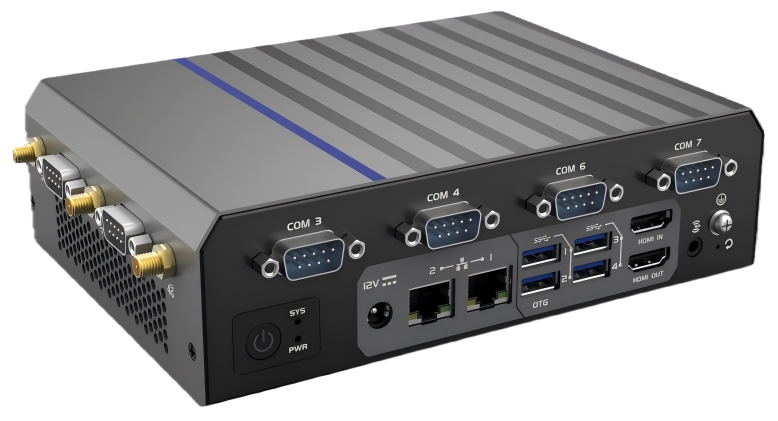
Product Overview
The Edge Box GX500M is an industrial-grade RK3588J fanless embedded industrial PC with Aqara Studio cross-protocol management built in, designed for B2B projects such as large buildings, commercial buildings, and smart factories for multi-protocol access and centralized management. It offers strong computing power and rich interfaces, supports local LAN access, and enables internet remote proxy access via the Aqara IoT cloud, helping build flexible, secure, and efficient smart space systems.
This product is an Aqara Studio edge host (host role, not a sub-hub), uses wired onboarding, and does not support the Aqara Home app.
Sales Information
Sales Regions
Chinese Mainland, European Union (B2B channel)
Installation Instructions
Installation Prerequisites
Supports standard desktop installation, book-style wall mounting, DIN rail mounting, and VESA mounting; a DIN rail mounting kit is included.
Installation Precautions
- Use the included 12V⎓5A power adapter for power supply;
- Make sure the device is powered off before installation and wiring;
- Do not use in humid, high-temperature, or strong electromagnetic interference environments;
- Keep the heat dissipation surface ventilated; do not block it.
User Instructions
Quick Setup
1. Power on
Connect the 12V⎓5A power adapter to the DC-IN interface.
2. Networking (wired)
This product is an Aqara Studio all-in-one device; it requires an HDMI monitor, mouse, keyboard, and network cable for use.
3. Access Aqara Studio
Aqara Studio opens automatically on startup.
4. Connect devices
In Aqara Studio, connect and manage devices by protocol (supported protocols are subject to the Studio compatibility list and plugin authorization).
5. Expansion (optional)
NVMe SSD, 4G/5G modules and other expansions can be installed; see the supplier datasheet for details.
Product Features
Key capabilities
- Aqara Studio edge host: Studio built in, supports local deployment and cross-protocol management;
- Multi-protocol interfaces: 2× RJ45 Gigabit, 4× RS-485, 2× RS-232, GPIO, Wi-Fi 5, Bluetooth 5.2, 4G/5G (optional);
- Local automation: supports local execution of Studio automation Flow;
- Data export: supports Haystack and OpenAPI;
- Local device log storage;
- Hub replacement;
- Anti-misdelete, static IP;
- Firmware upgrade.
Interface description
| Interface | Description |
|---|---|
| DC-IN | 12V⎓5A power input |
| 2× RJ45 | Gigabit Ethernet |
| 4× DB9 RS-485, 2× DB9 RS-232 | Serial ports |
| 1× DB9 GPIO, 1× DB9 Debug | GPIO / Debug |
| 4× USB 3.0 | USB |
| 1× HDMI 2.1 Tx (output), 1× HDMI 2.0 Rx (input) | Display |
| 1× 3.5mm Line out | Audio |
| 1× TF card slot, 1× Micro SIM | Storage / mobile network |
| 6× SMA antenna interfaces | Antenna |
Button / indicator
Power button, Recovery button, dual-color LED indicator (customizable).
Precautions
Usage Precautions
- This product is professional equipment; installation and maintenance should be performed by professionals;
- Use a 12V⎓5A power supply that meets the specification; do not use an incompatible power supply;
- For indoor use only. Do not use in humid environments or outdoors;
- Keep dry. Do not spill liquids onto this product;
- Do not place this product near heat sources; keep the heat dissipation surface ventilated;
- Do not disassemble or repair this product yourself; authorized professionals should handle it.
Supported Hub Information
Hub Replacement
Supports hub replacement.
Automation Information
Supported Automation Actions
Restart the entire device; delay duration; run scene; ringtone play/stop; set device volume
Product Certification
CCC, CE Class A; EMC compliant with IEC 61000-4-2 (ESD level 3), IEC 61000-4-4 (EFT level 4)
Product Warranty
Warranty Statement
TBD (B2B product; warranty terms are subject to the commercial contract / after-sales policy)
Troubleshooting Guide
Fault Symptoms, Possible Causes, and Solutions
Common inability to access Studio:
- Confirm the device and the accessing terminal are on the same LAN;
- Access via the device's default management address or the IP assigned by the router;
- Check the network cable and switch status;
- mDNS may fail across VLANs; use a static IP instead.
Specific Notes
Low-Power Radio Device Instructions
TBD (this product includes Wi-Fi / Bluetooth / 4G / 5G; low-power compliance statements are subject to the official user manual)
Product Selling Points
Selling Point Description
- Industrial-grade RK3588J fanless design, strong computing power and reliability
- Rich interfaces: 4× RS-485 + 2× RS-232 + 2× RJ45 Gigabit + 4× USB 3.0 + HDMI in/out
- Aqara Studio built in, unified multi-protocol access and centralized management
- Supports 4G/5G, Wi-Fi 5, Bluetooth 5.2 wireless/mobile networking
- Supports NVMe SSD and TF card storage expansion
- Supports desktop/wall-mount/DIN rail/VESA mounting
- Supports Haystack / OpenAPI data export for system integration
Product Image