Host Access Domain Name Access
Overview
To simplify access, Aqara Studio provides a dedicated host access domain name (HTTP). You no longer need to remember or look up potentially changing local IP addresses. Simply enter this domain name in your browser to access Aqara Studio stably and conveniently.
Get Host Access Domain Name
You can get the host access domain name through any of the following two methods:
-
Method 1: Find it on the device (e.g., M300).
-
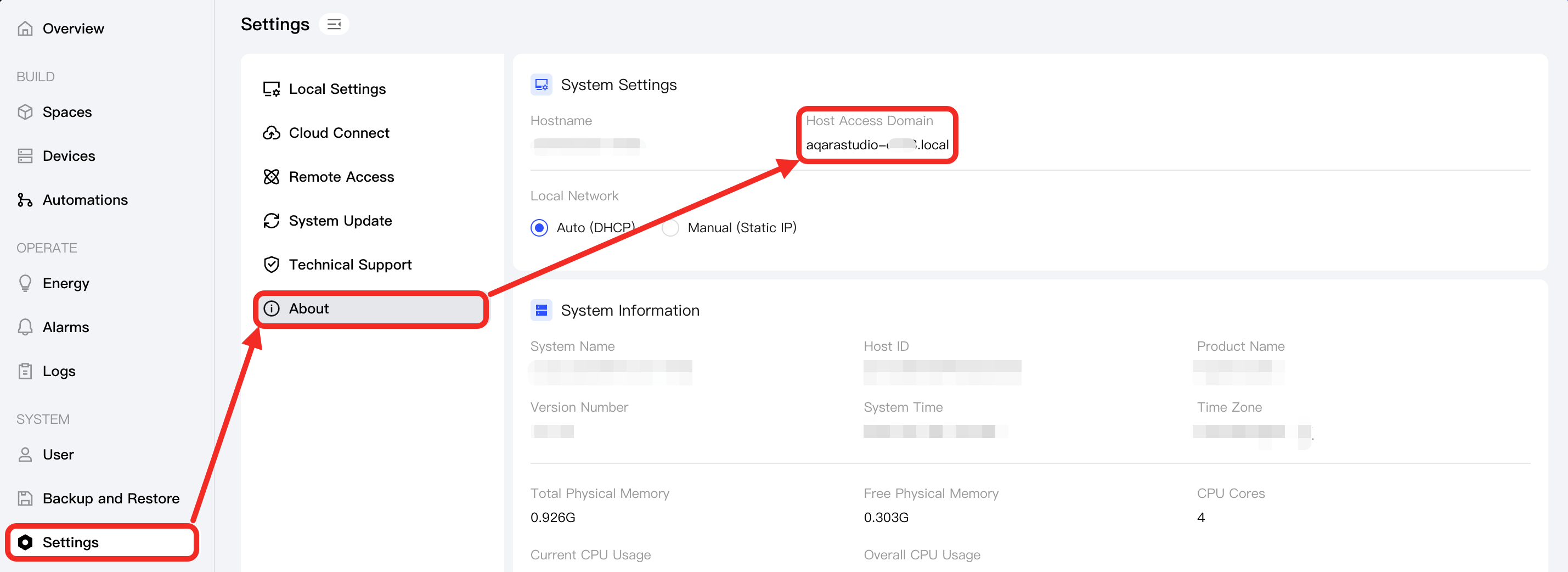
Method 2: Get it from Aqara Studio.
- Click Settings in the left navigation bar.
- In the sidebar of the Settings page, click About.
- Find and copy the value of Host Access Domain.
Use Host Access Domain Name to Access Aqara Studio
In the browser address bar, enter http:// followed by this domain name (e.g., http://aqarastudio-xxxx.local) to quickly access the Aqara Studio platform.